

In This Article
Knowing that “Gemini” means four different Google surfaces is half the job. The other half is knowing what to fix on one specific page. This article is the page-level workflow: a seven-block template you can run against any URL, and how NovaX shows you which block is failing.
In How to Optimize Your Website for Gemini I covered what Google documents: which surface has which control, what to check first, and what is hype. I will not repeat that here. This article asks a narrower question. Given a single page, what do you look at, in what order, and how do you know afterwards whether anything changed?
I use NovaX for that. It scores each page against engine-specific signals, one engine at a time. For Gemini, it models one particular idea: that the engine behaves like an E-E-A-T and Knowledge Graph filter. That model is useful, and it is also a model, not a view inside Google. I keep the two apart throughout, and the section on evidence levels says exactly where the line sits.
What is in This Series
This article is part of the cluster How to Measure Your Presence in AI Search Engines. The hub also contains AI Search Visibility Share of Voice, and a pair of articles for each engine:
- ChatGPT: optimize and measure
- Perplexity: optimize and measure
- Claude: optimize and measure
- Gemini: optimize and measure
- Copilot: optimize and measure
- Grok: optimize and measure
The optimize articles say what the engine’s owner documents. The measure articles say how to track presence over time. This one sits between them: it is the hands-on step where you inspect a page and decide what to change.
What the Gemini Engine Is?
Gemini is the E-E-A-T and Knowledge Graph engine: it asks whether a page is real, whether it is authoritative, and whether it adds something new. Those are the three questions the engine profile is built around, and every signal in the report maps to one of them.
- Is this real? Do the page’s main topics connect to recognised entities in Google’s Knowledge Graph, or are they unverifiable strings?
- Is this authoritative? Is there an explicit author and publisher, expressed as Person and Organization schema, so the content has a verifiable source?
- Does this add something new? Does the page contain original data, first-hand perspective or a unique angle, or does it restate what already exists?
The third question is the one that matches Google’s own documentation most closely. Google says unique, non-commodity content is the factor most likely to shape presence in generative search. The first two are NovaX’s way of turning E-E-A-T into things a crawler can check on a page.
One point of scope matters before you read any score. As I explained in the Gemini optimize article, “Gemini” covers AI Overviews, AI Mode, the Gemini app and apps built on Gemini. The NovaX engine profile scores page-level signals that are relevant to all of them. It does not tell you which surface cited you, and it cannot see your Search Console settings. The access checks in Step 1 of that article still have to be done by a person.
How to Read the NovaX Gemini Report
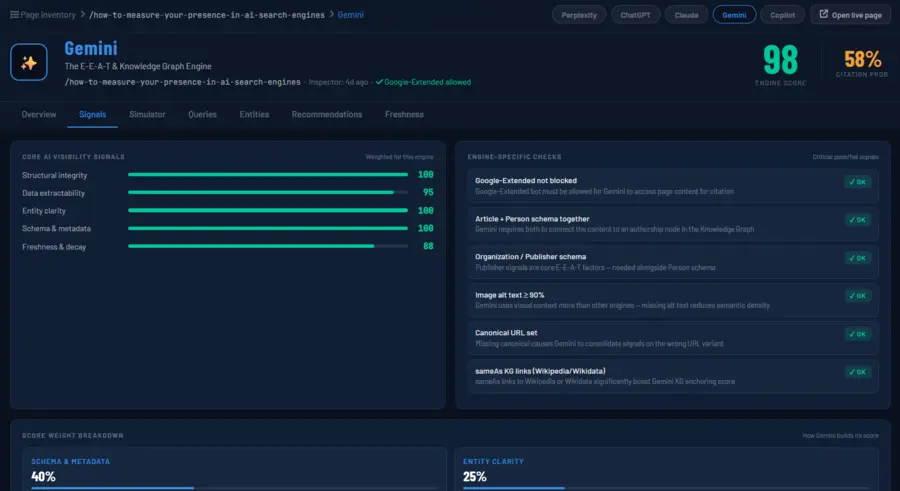
Read two numbers first, then the signals underneath them, and never act on the headline alone. A Gemini report opens with an Engine Score out of 100 and a Citation Probability as a percentage. They answer different questions, and they can disagree.
- Engine Score: how completely the page’s signals match what the Gemini profile looks for and how good Gemini understands your page.
- Citation Probability: a more cautious eligibility estimate. In the report I am using as the example, a page scored 97 out of 100 and 57% citation probability, and NovaX labelled that “moderate eligibility”.
Those two are not the same. Engine can understand your page well and still decide not to cite you, if freshness signals are old or missing, if your entities are not clear, and so on. A high score beside a middling probability is not a bug to explain away. It tells you the page is well formed and still has gaps worth reading. When the two diverge, open the detail before you celebrate either number.
The engine weights its score in four parts:
| Component | Weight | What it covers for Gemini |
|---|---|---|
| Schema & metadata | 40% | Article, Person and Organization schema together, the highest-value combination for E-E-A-T |
| Entity clarity | 25% | Knowledge Graph connected entities and proper Person markup |
| Freshness | 20% | dateModified and the reviewed update history, inherited from Google’s index |
| Structural integrity | 15% | Heading structure and canonical URL alignment with Google’s index |
The report also shows a fifth signal, data extractability, which sits beside these four without a listed weight for Gemini. I read it as supporting context, and not as something that drives the score.
The tabs then split the page into parts you can act on:
| Tab | What it tells you | What you do with it |
|---|---|---|
| Overview | Score, citation probability, top actions, issues, engine-specific checks | Decide where to start |
| Signals | The five core signals scored individually | Find the weakest block of the template |
| Simulator | Projected score impact of each fix | Order fixes by payoff before you touch the page |
| Queries | The questions found on the page and how eligible each is | Spot weak or noisy question headings |
| Entities | Entities detected, their type, schema status and clarity | Decide which entities deserve markup |
| Recommendations | Specific issues raised by the Inspector | Fix the cheap, concrete ones |
| Freshness | Freshness score and sensitivity for the engine | Decide whether a re-index request is worthwhile |
The Simulator is the part I use most. You tick the fixes you plan to make and it projects the score change, so you can see in advance whether a fix is worth an hour. In the example report, adding dateModified to the JSON-LD was projected at +5.
The Universal Gemini Page Template
Seven blocks cover everything the Gemini profile checks, and they apply to any page on any site. Work through them in order. The first is about not locking yourself out, and the last is about being retrievable for the follow-up questions a buyer actually asks.
1. Access: do not exclude yourself
- Goal: the page can be crawled, indexed and shown with a snippet, and Google-Extended is a decision, not an accident.
- NovaX checks: whether Google-Extended is blocked, and whether a canonical URL is set. A missing canonical makes Gemini consolidate signals on the wrong URL variant.
- You check by hand: the Search generative AI setting in Search Console,
nosnippet,max-snippetandnoindex. These are covered in Step 1 of the Gemini optimize article, and a page-level scanner cannot settle them for you. - Done when: nobody can name a setting on this page that blocks it by accident.
2. Identity: author and publisher together
- Goal: the page names a real author and a real publisher, in markup and in the visible text.
- NovaX checks: Article and Person schema together, and Organization or Publisher schema alongside them. This combination carries the largest weight in the Gemini score, at 40%.
- Fix: give the Person a
name, ajobTitleand asameAslink to a LinkedIn profile or a bio page. Give the Organization the same, pointing to a Crunchbase or Wikipedia entry if one exists. Link the byline to a real author page. - Done when: the schema and the visible byline describe the same people.
3. Entities: connect to what already exists
- Goal: the main topics on the page are things Google can recognise, not strings it has to guess at.
- NovaX checks: which entities it detects, their type, whether they have schema, and a clarity percentage for each.
- Fix: for entities that exist in the Knowledge Graph, add
sameAslinks to their Wikipedia or Wikidata pages. In the report’s own words, this is the single most impactful change for Gemini. - A rule I apply: do not invent
sameAslinks for your own frameworks and coined terms. A concept you named last year has no Wikipedia page. Define it plainly in the text and link it to your own glossary entry. Entities like that will show lower clarity, and that is an honest reading. - Done when: every entity with a real Knowledge Graph node is linked to it, and every coined term is defined where it first appears.
4. Information gain: say something new
- Goal: the page contains something a reader cannot get by summarizing the top ten results.
- NovaX checks: whether the page shows a unique angle, primary data or a first-hand insight.
- Fix: add one clearly labelled section, such as “Our findings” or “What this means for [industry]”, with two or three sentences of genuine original insight. A client result, a measurement or a documented failure all count. Rephrased common knowledge does not.
- Done when: you could point to the paragraph that no competitor page contains.
5. Visual context: alt text and image meaning
- Goal: images carry meaning, and that meaning is in text a machine can read.
- NovaX checks: whether at least 90% of images have alt text. Gemini uses visual context more than the other engines in the set, so missing alt text lowers the page’s semantic density.
- Fix: write alt text that describes what the image shows and why it is on the page. Skip decorative filler.
- Done when: no content image is missing alt text. Check the Recommendations tab as well, because a page can pass the 90% check and still list individual images to fix.
6. Freshness: show the real update history
- Goal: Gemini can see when the page was last materially changed.
- NovaX checks: the freshness score and whether
dateModifiedis present in the JSON-LD and on page for human readers. - Fix: set
dateModifiedin the schema, matching the visible “Updated” date. After a major rewrite, request re-indexing in Search Console. - Rule: change the date only when the content changes. A date that moves without an edit is a signal you do not want to teach the engine to distrust.
- Done when: the schema date, the visible date and the actual last edit agree.
7. Sub-questions: answer the follow-ups
- Goal: the page can be retrieved for the questions around the main question, not only the one in the title.
- NovaX checks: the question-style headings it finds on the page and how eligible each one is.
- Fix: make sure the obvious follow-ups (cost, risk, alternatives, who it is for, how long it takes) each have a clearly headed answer. Then read the list for noise. Navigation labels and footer links can be picked up as questions, and they should not be there.
- Done when: every extracted question is one a real reader would ask.
Ready to see how Gemini sees you?
If you would like the access, schema, entity and content gaps scoped across a whole site, that is the work I do in Enterprise Search Advisory, and you can talk to me here.
The schema skeleton for blocks 2, 3 and 6
Adapt this, and do not paste it as is. Every value must match what is visible on the page.
{
  "@context": "https://schema.org",
  "@type": "Article",
  "mainEntityOfPage": "https://example.com/your-page/",
  "headline": "Your page title",
  "datePublished": "2026-01-15",
  "dateModified": "2026-11-20",
  "author": {
    "@type": "Person",
    "name": "Author Name",
    "jobTitle": "Their real job title",
    "url": "https://example.com/author/author-name/",
    "sameAs": ["https://www.linkedin.com/in/author-profile/"]
  },
  "publisher": {
    "@type": "Organization",
    "name": "Your Organization",
    "url": "https://example.com/",
    "sameAs": ["https://www.crunchbase.com/organization/your-org"]
  },
  "about": [
    {
      "@type": "Thing",
      "name": "A topic that has a real Wikipedia page",
      "sameAs": ["https://en.wikipedia.org/wiki/Topic_name"]
    }
  ]
}
A Worked Example: One Page, One Report
A page can score 97 out of 100 and still have a short, useful to-do list, and the skill is in sorting that list. Here is a real NovaX Gemini report for one page, a multilingual SEO cannibalization case study. The specific numbers will differ on your pages. The reading order will not.
The headline: Engine Score 97 (“Strong”), Citation Probability 57% (“moderate eligibility”), zero issues detected, Google-Extended allowed, and all six engine-specific checks passing. The score and the probability disagree, so I read the detail.
| What the report shows | What I make of it | Action | Priority |
|---|---|---|---|
| Last Inspector run was 73 days ago | Every number below describes an old version of the page | Re-inspect first | 1 |
Top action: add dateModified to the JSON-LD, projected +5 | A cheap, concrete fix with a projected payoff (block 6) | Add it, matching the visible date | 2 |
| Recommendations: 4 images missing alt text, though the 90% check passes | The pass hides individual gaps (block 5) | Write the four alt texts | 3 |
| Freshness 88, data extractability 80, the two lowest core signals | Neither is broken; both have headroom | Update the page when it is next materially edited | 4 |
| 16 entities detected, 4 with schema, average clarity 67 | Real entities (SEO, Artificial Intelligence) lack schema; coined concepts sit at 48 to 56% | Mark up the real ones; define the coined ones in text (block 3) | 5 |
| Extracted questions include “How to learn WordPress?”, “What is Get Involved?” and “Documentation?” | These come from site navigation or footer text, not from the article (block 7) | Fix the template so navigation is not read as content | 6 |
Three things in that table are worth saying out loud.
The empty issues list does not mean nothing to do. The report says to address critical issues while listing none. The Simulator and the Recommendations tab are where the real work was.
Noisy queries are a site problem, not a page problem. Questions about WordPress on a page that is not about WordPress usually mean navigation or footer text is being read as content. Fixing it once in the theme cleans the extraction for every page.
Do not chase 100 on the entities. The coined concepts scored lowest, and that is the honest reading of an idea that has no Knowledge Graph node. The right fix is a clear definition, not a forged link.
The result of working that list is a re-inspected page with a higher projected score. It is not a guarantee of citations, which is the subject of the next section.
What NovaX Measures vs What Google Documents
A NovaX score is a model of what tends to go with eligibility. It is not Google’s own weighting, and nobody outside Google has that. I built NovaX, so you should read my claims for it with that in mind. In the Gemini optimize article I noted that Google says no third-party tool has access to its internal ranking or AI systems. That applies to NovaX as much as to any other tracker.
So the weights in the report, such as the 40% on schema, are NovaX’s modelling choices. Here is how each part of the template stands against what Google itself says, as I read it from the guidance I cited in the Gemini optimize article.
| Template block | Google’s position | NovaX’s treatment | My read |
|---|---|---|---|
| 1. Access (indexable, snippet-eligible, canonical) | Documented requirement for AI Overviews and AI Mode | Canonical and Google-Extended checks | Do first. The strongest evidence of any block |
| 1. Google-Extended allowed | Documented: covers training and Gemini app grounding, not Search inclusion | Pass or fail engine check | A real decision with a visibility cost, and it does not affect AI Overviews |
| 2. Article + Person + Organization schema | Says there is no special markup for generative search, and that markup must match visible text | Weighted 40% | Good identity hygiene. The weight is NovaX’s model |
3. sameAs to Wikipedia or Wikidata | Not part of the guidance I cited | Called the most impactful change | A plausible Knowledge Graph signal. Treat as a hypothesis, cheap where the entity is real |
| 4. Information gain | Unique, non-commodity content is the factor most likely to shape presence | Pass or fail content check | The best-aligned block. The long game |
| 5. Alt text and visual context | Not documented as a Gemini control | 90% threshold check | Standard image and accessibility practice |
6. dateModified and freshness | Not documented as a Gemini control | 20% weight, +5 projected in the example | Cheap and honest if the date is real |
| 7. Sub-question coverage | Documents query fan-out; the page advice is my inference | Query eligibility tab | Cheap. Do it |
What a score can and cannot do follows from that table. It can show you whether a page is complete against a defined checklist, order your fixes by projected payoff, catch regressions after a template change, and compare pages on the same site. It cannot prove that a fix caused a citation, show which Google surface used the page, or see settings that live in Search Console.
The Fix-and-Verify Loop
Run the loop on one page first, then on the pages that matter most, and keep each round small enough to attribute. Changing seven things at once tells you nothing about which one worked.
- Inspect. Run the page through NovaX and open the Gemini report. Note the Engine Score, the Citation Probability and the date of the inspection.
- Check access by hand. Confirm the Search Console setting, snippet controls and indexing status, because the report cannot see them.
- Simulate. Use the Simulator to see which fixes carry the highest projected impact, and tick the ones you plan to make.
- Fix in template order. Work through blocks 1 to 7, cheapest and most concrete first. Fix site-wide problems, such as navigation being read as content, in the theme and not page by page.
- Request re-indexing for pages with major changes, using Search Console.
- Re-inspect. Run the page again and compare. Did the blocks you touched improve, and did anything else regress?
- Measure over time. A score changing is not the same as being cited more. For that, track presence against named competitors with the method in How to Measure Your Presence in Gemini, and see AI Search Visibility Share of Voice for the wider picture.
Two supporting reads help at the writing stage: How to Write a Blog Post for AI SEO and Citations and AI Content Structure for Enterprise Visibility. For the schema side in more depth, see Schema Markup for AI Search: What Actually Matters?
Where to Go From Here?
Start with the AI Visibility Inspector on one page you care about, and work the seven blocks in order. When you need Gemini tracked across your pages and against named competitors over time, NovaX covers it. And if you want the access, schema, entity and content gaps scoped for your organization, contact me.
What This Is NOT
This is not a promise that a higher score earns more citations. It is not a replacement for the Search Console checks, which no page scanner can do for you. It is not a claim that Google uses NovaX’s weights, because it does not publish its own. And it is not a case for adding schema in place of writing something worth citing, since the information gain block is the one Google’s own guidance supports most strongly.
It is a way to inspect one page against a defined checklist, fix the cheap and concrete gaps first, and confirm afterwards that the page actually changed.
FAQ
It is the engine profile that scores a page against E-E-A-T and Knowledge Graph signals: whether the page is real, authoritative and adds something new. It scores page-level signals. It does not tell you which Google surface cited you.
The Engine Score shows how completely a page’s signals match the Gemini profile. The Citation Probability is a more cautious eligibility estimate. They can differ, as a 97 score beside a 57% probability shows, and the gap is a reason to read the detail.
Google says there is no special markup for generative search, and that structured data must match visible text. NovaX weights the combination heavily because it makes authorship and publisher identity explicit. I treat it as good hygiene, not as a documented requirement.
Where the entity genuinely has a page, yes, because it is cheap and it anchors the entity. Do not invent links for terms you coined yourself. Define those clearly in the text instead.
No. Per Google, Google-Extended covers training of future Gemini models and grounding in the Gemini app, and it does not affect inclusion in Google Search. AI Overviews depend on indexing and snippet eligibility.
The summary text is generic. Use the Simulator and the Recommendations tab for the concrete fixes.
A strong score means the main signals are in place. The remaining items, such as a missing dateModified, a few images without alt text or entities without markup, are the gaps between strong and complete.
After any material change, and before acting on a report that is old. In the worked example the last inspection was 73 days earlier, so the first step was to run it again.
No. You can promise a baseline, a fixed set of changes and repeated measurement.
