

In This Article
Your team says “we need to be in Gemini”, and when you ask which Gemini they mean, nobody can answer.
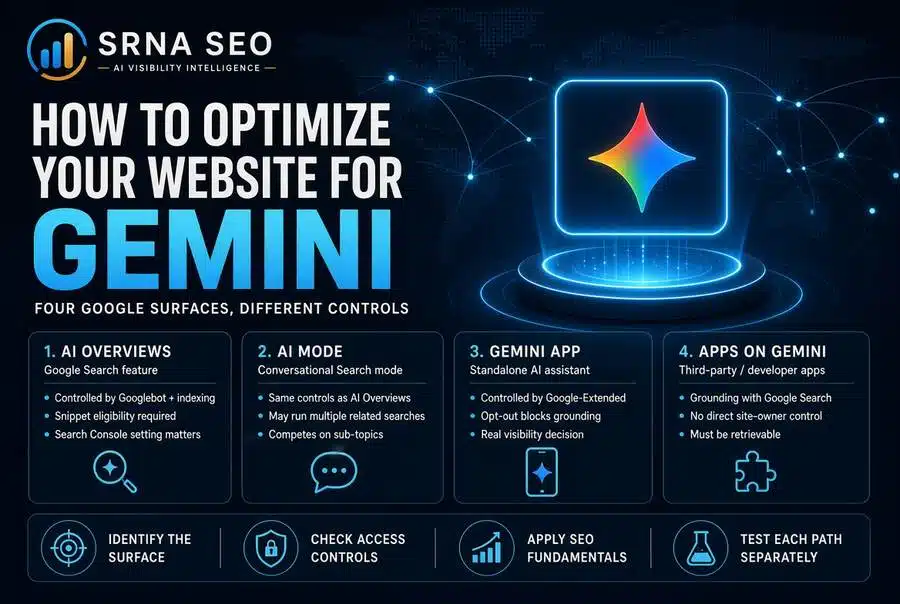
That question is the whole job. “Gemini” is not one place to be found: AI Overviews and AI Mode are features of Google Search, controlled through Googlebot and a Search Console setting, while the Gemini app is a separate product controlled through Google-Extended. And Google’s own guidance says that optimizing for its AI features in Search is SEO. So optimizing a website for Gemini means working out which surface you are talking about, checking that you have not locked yourself out of it, and then doing the search fundamentals that most sites still neglect.
What is in This Series
This article is part of cluster How to Measure Your Presence in AI Search Engines, the series hub containing the: How to Optimize Your Website for ChatGPT, How to Measure Your Presence in ChatGPT, How to Optimize Your Website for Perplexity, How to Measure Your Presence in Perplexity, How to Optimize Your Website for Claude, How to Measure Your Presence in Claude, How to Optimize Your Website for Gemini, How to Measure Your Presence in Gemini.
What “Optimizing for Gemini” Means
Optimizing for Gemini is the work of making your pages eligible to be linked from Google’s AI Search features, readable by the Gemini app when it grounds an answer, and consistent with what Google says about each surface. Gemini is Google’s family of AI models, and the word is used loosely for several products. I use these terms:
- AI Overviews: AI-generated summaries that appear within Google Search results.
- AI Mode: a conversational search mode inside Google Search.
- The Gemini app: Google’s standalone AI assistant.
- Grounding: supplying the model with retrieved content at the moment it answers, so the answer is not from memory alone. Developers building on Gemini use “Grounding with Google Search” for this.
The reason this matters is that each surface has its own control, its own reporting and its own gaps, and teams that treat “Gemini” as one thing end up with one policy that is wrong for three of the four.
Four Surfaces, Four Different Situations
The table below is built from Google’s documentation. The last column is my judgment.
| Surface | What controls your presence | What Google documents | My read |
|---|---|---|---|
| AI Overviews | Googlebot access, indexing, snippet eligibility, the Search generative AI setting | Page must be indexed and eligible to appear with a snippet, with no extra technical requirements | Ordinary SEO, plus two settings to check |
| AI Mode | Same as AI Overviews | Same as AI Overviews. Google says it may issue several related searches to build a response | Same work, but competes on sub-topics too |
| Gemini app | Google-Extended in robots.txt (training and grounding) | Opting out means content is not used for grounding | A real visibility decision, not only a legal one |
| Apps built on Gemini with Search grounding | Not a site-owner setting I could find | Developers enable the tool, and the model decides whether to search | You cannot control it. You can only be retrievable |
Treat the four surfaces as four situations, because a policy written for one will quietly break another. The classic example is a blanket “block all AI crawlers” rule, which can touch Google-Extended and with it the Gemini app, while doing nothing about AI Overviews at all.
Step 1: Check That You Have Not Excluded Yourself
This is the cheapest and most overlooked step, and it comes first because it is the only one with a clear before and after.
Google’s documentation says that to be shown as a supporting link in AI Overviews or AI Mode, a page must be indexed and eligible to appear in Search with a snippet. Google adds no other technical requirements. It also says that meeting them does not guarantee crawling, indexing or serving. So the first audit is about things your own organization may have switched off:
- The Search generative AI setting. In Search Console, under Settings, there is a control with three options: Include (the default), Exclude and Inherit from parent. Per Google’s help page for it, it covers AI Overviews, AI Mode and generative AI features in Discover. It does not cover Gemini. If someone sets Exclude, your content cannot be used as input for those features, and you lose the impressions and traffic. Google says exclusions usually take effect within one to two days.
- Inheritance. Child properties follow the closest parent that has been manually configured. In a large organization with many subdomains and properties, one decision on a parent property can cascade. I would check every property, not just the main one.
- Snippet controls.
nosnippet,data-nosnippetandmax-snippetlimit what can be shown from your pages, and Google lists them as the way to restrict information shown. A sitewidenosnippet, added by a well-meaning legal or brand team, makes pages ineligible by the very requirement above. - Indexing.
noindexkeeps a page out of Search entirely.
If any of these is set deliberately, fine. If nobody can say who set it or why, you have found your first fix. For a structured check of crawl and indexation, start with my Indexation and Crawl Diagnostic.
Step 2: Do the Search Fundamentals Google Tells You To Do
Here is the part I did not expect when I read Google’s AI optimization guide: it is plain about this. Generative features, it says, are rooted in Google’s core ranking and quality systems, which retrieve and ground AI responses in pages from the Search index. The list of what to do is short:
- Keep content crawlable and indexable, following JavaScript SEO practices where relevant.
- Make text accessible and organized, with clear paragraphs, sections and headings.
- Use internal links so pages can be found.
- Make structured data match the visible text. Not required for generative search, but standard practice.
- Keep Merchant Center and Business Profile information current where they apply.
- Do not mass-produce pages for query variations. Google says creating them primarily to manipulate rankings or generative AI responses violates its scaled content abuse policy.
And then the thing that matters most, in Google’s own words as I read them: unique, non-commodity content, meaning original, first-hand, expert perspectives, is the factor most likely to shape your presence in generative search over time. Summaries of common knowledge are the weakest position, because anyone can write them and the model already has them.
Want to see how AI systems currently describe your brand before you change anything? Run the AI Visibility Inspector (my diagnostic tool for checking how AI systems see a brand). A baseline first, or you will credit your edits for noise.
What Google Says You Do Not Need
The same guide lists things it says are not needed for Google’s generative features:
- llms.txt, AI text files or Markdown files. Google Search does not use them.
- Special schema.org markup. There is none for generative search.
- Chunking your content into small pieces. There is no ideal page length.
- Rewriting for every long-tail variant. The systems understand synonyms and intent.
- Artificial mentions across the web. Google says chasing inauthentic mentions is not as helpful as it might seem, and that other systems block spam.
- Separate “AEO” or “GEO” tactics. Google says optimizing for generative AI search is still SEO, and points readers to its guidance on evaluating third-party SEO advice. The “no separate tactics” conclusion is my reading of that, not Google’s words.
I work in this field, so let me be direct about it. For Google’s own surfaces, I broadly agree. I would not sell you a separate list of Google-AI tricks, and you should be suspicious of anyone who does. Google also says that no third-party tool has access to its internal ranking or AI systems, which is the reason I describe every tracker, mine included, as sampling and not as a window into Google. Where GEO as a discipline earns its place is cross-engine measurement and the engines that are not Google, which the rest of this series covers.
Step 3: Write for Sub-Topics, Not Just the Head Question
Google says AI Overviews and AI Mode may issue several related searches across subtopics and data sources to build a response, a behavior it calls query fan-out, and that this can surface a wider and more varied set of links than a classic search.
My inference, not a documented rule: a buyer’s single question can split into several searches, so your page may be retrieved for a sub-question and not for the question the buyer typed. In practice that means a strong page answers the obvious follow-ups (cost, risk, alternatives, who it is for, how long it takes) in clearly headed sections. That is not chunking. It is what a thorough expert page already does. The writing side is in How to Write a Blog Post for AI SEO and Citations, and the structure side in AI Content Structure for Enterprise Visibility. For what the shift means for traffic, see Zero-Click Visibility.
If you want a straight read on whether your gap is access, eligibility, content or authority, that is the kind of work I do in Enterprise Search Advisory, and you can talk to me here.
Step 4: Decide Google-Extended Knowingly (The Gemini App)
Now the second surface. Google’s crawler documentation describes Google-Extended as a robots.txt token that lets publishers manage whether content Google crawls can be used to train future generations of Gemini models, and also for grounding in the Gemini app and in Grounding with Google Search on Vertex AI. The same page says Google-Extended does not affect inclusion in Google Search and is not a ranking signal. It has no separate HTTP user agent string, because crawling uses existing Google user agents.
Read that carefully, because two things follow. First, blocking Google-Extended is not only a training decision. Per Google’s description, it also covers grounding in the Gemini app. Second, you will never see Google-Extended in your server logs, since it is not a user agent.
An example, to adapt and not paste:
User-agent: Google-Extended
Disallow: /
Blocking Google-Extended trades Gemini app visibility for training opt-out, and nobody sends you an invoice for the visibility. That may still be the right call, especially for content with intellectual property or licensing constraints, and it belongs with legal as much as with SEO. I covered that side in Everything You Need to Know About AI Intellectual Property. Just make it knowingly. Also note that Google published a post in October 2026 titled “Supporting a shared AI training control for websites”. I could not write here its body, so check it before you finalize your robots.txt policy: Not enough available data from my reading.
A Note on Google-Agent
One more documented item. Google-Agent identifies agents that run on Google’s infrastructure and browse and act when a user asks. Per Google’s user-triggered fetchers page, such fetchers generally disregard robots.txt because a user initiated the request. Google publishes IP ranges, and the page cautions that user agent strings can be spoofed, so verify the request. For your site, the practical consequence is that robots.txt is not the control for this traffic.
What Is Documented vs What Is Guesswork
| Tactic | Evidence level | My read |
|---|---|---|
| Check the Search generative AI setting on every property | Documented by Google | Do first. Binary |
| Remove accidental nosnippet or noindex | Documented requirement (snippet eligibility) | Do first |
| Make pages indexed, crawlable, accessible | Documented by Google | Baseline |
| Unique, first-hand content | Google calls it the factor most likely to shape presence | The long game |
| Decide Google-Extended separately | Documented (training and Gemini app grounding) | A joint legal and visibility call |
| Answer likely sub-questions | Inference from query fan-out | Cheap. Do it |
| llms.txt, special schema, chunking | Google says not needed for Search | Skip for Google |
| Separate “GEO” tactics for Google surfaces | Google says it is SEO | Do not buy the hype |
What This Is NOT
This is not a ranking guide. Google documents no ranking for these features beyond saying they rest on core ranking and quality systems, and it guarantees nothing. It is not a case for ignoring SEO, because Google’s guidance is that SEO is the work. It is not a case against GEO either, only against selling it as a Google-specific tactic list. And it is not finished when the settings are right. You change something, then you check whether the picture changed, which is what How to Measure Your Presence in Gemini covers.
Estimated Gain After Implementation
There is one exception where the before and after is clear. If an accidental exclusion, nosnippet or noindex is blocking your pages, removing it changes your eligibility directly, and Google says exclusion changes take effect within a few days. Everything else is cumulative. Unique content and authority are slow, and anyone promising a percentage on them is guessing.
The Uncomfortable Part
The best Gemini optimization is the SEO you already own and have neglected, and Google tells you so in writing. That is not a satisfying message for a team that wants a new budget line with “AI” in the name. But the documentation is clear that generative features retrieve from the same index and the same quality systems. If your fundamentals are weak, a GEO project will not rescue them. If you have never audited who set Exclude on your Search Console properties, start there before you spend a euro on anything else.
FAQ
No. AI Overviews and AI Mode are Google Search features. The Gemini app is a separate product. Applications built by developers on Gemini are a third situation. Each has different controls and reporting.
According to Google’s documentation, the page must be indexed and eligible to appear in Search with a snippet, and Google adds no other technical requirements. It also says meeting them does not guarantee crawling, indexing or serving.
A Search Console setting with Include (default), Exclude and Inherit from parent. It covers AI Overviews, AI Mode and generative AI features in Discover, not Gemini. Excluding removes your content as input and costs you impressions and traffic from them.
No. Google states it does not affect inclusion in Google Search and is not a ranking signal. It does cover training of future Gemini models and grounding in the Gemini app, so blocking it has a visibility cost there.
No. Google says it has no separate HTTP user agent string, so it works only as a robots.txt control.
For Google Search’s generative features, Google says no. It says Search does not use llms.txt, there is no special schema.org markup for generative search, and no chunking is required.
Google says AI Overviews and AI Mode may issue several related searches across subtopics to build a response. My inference is that pages should answer the obvious follow-up questions in clearly headed sections.
Per Google, user-triggered fetchers generally disregard robots.txt because a user initiated the request. Verify requests against Google’s published IP ranges.
No. Not enough available data exists for an honest range. Promise a baseline, a fixed set of changes and repeated measurement.
Where to Go From Here?
Start with the AI Visibility Inspector for a first read. When you need Gemini tracked over time against named competitors, NovaX (my AI Visibility Intelligence Platform) covers it. And if you want the eligibility, settings and content gaps scoped for your organization, contact me.
This article was researched and drafted with the assistance of AI tools and reviewed and edited by author prior to publication.
