

In This Article
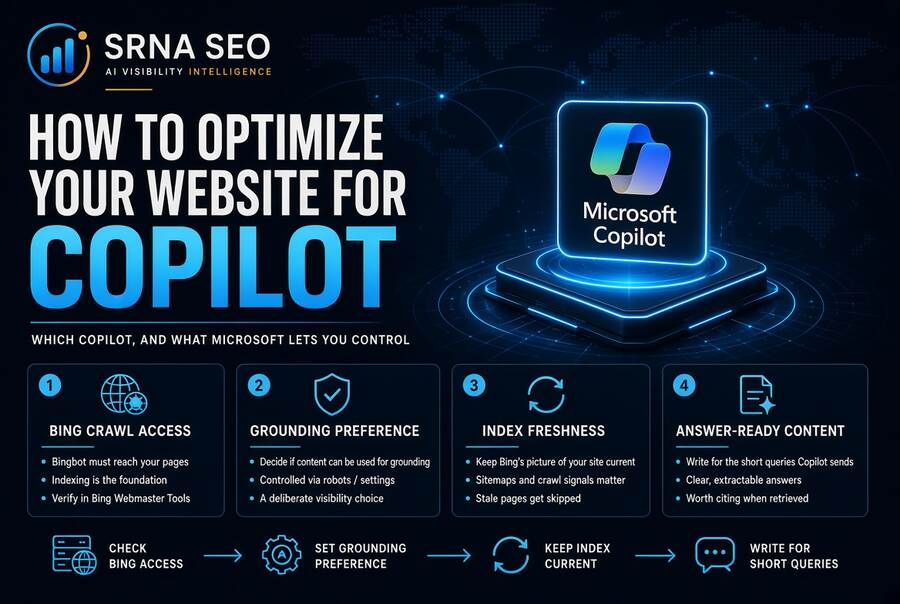
Your team says “we need to show up in Copilot”, and when you ask which Copilot, the room goes quiet. “Copilot” is a family of products, and the part you can influence as a site owner runs through Bing: Microsoft documents Bing as the search service behind web grounding in Microsoft 365 Copilot, and Bing Webmaster Tools now gives you a first-party report on how often your pages are cited. So optimizing a website for Copilot means checking that Bing can crawl and index you, setting your grounding preference on purpose, keeping your sitemap honest, and then doing the content work that earns a citation.
What is in This Series
This article is part of cluster How to Measure Your Presence in AI Search Engines, the series hub containing the: AI Search Visibility Share of Voice, How to Optimize Your Website for ChatGPT, How to Measure Your Presence in ChatGPT, How to Optimize Your Website for Perplexity, How to Measure Your Presence in Perplexity, How to Optimize Your Website for Claude, How to Measure Your Presence in Claude, How to Optimize Your Website for Gemini, How to Measure Your Presence in Gemini. The measurement half is How to Measure Your Presence in Copilot.
What “Optimizing for Copilot” Means
Optimizing for Copilot is the work of making your pages crawlable and indexable by Bing, permitted for AI grounding, and worth citing when Copilot answers a question from the web. I use these terms:
- Microsoft Copilot: Microsoft’s name for a family of AI experiences. Microsoft’s Copilot FAQ lists Copilot Chat, Microsoft 365 Copilot, Security Copilot, GitHub Copilot and Copilot Studio, among others.
- Grounding: supplying the model with retrieved content at the moment it answers, so the answer is not from memory alone.
- Bing: Microsoft’s search engine and index. Microsoft’s web search documentation names it as the search service Copilot uses for web queries.
- Bingbot: Bing’s crawler. I use “Bing can crawl you” as shorthand for the whole chain of crawling, indexing and permission.
This matters because, for the web side of Copilot, the retrieval layer is a search index you can verify access to, register with and report on. That is good news. It also means the unglamorous work (crawling, sitemaps, freshness) carries a lot of weight.
Which Copilot Are We Talking About?
The table below is built from Microsoft’s documentation. The last column is my judgment.
| Experience | What Microsoft documents | Site owner control | My read |
|---|---|---|---|
| Copilot Chat (work) | Grounded in public web data. Web search is governed by an admin policy | Bing access and your grounding preference | The most likely place a buyer at a company meets you |
| Microsoft 365 Copilot (Basic and Premium) | Web data in chat, and work data in Premium. Web search uses Bing | Same as above. Work data is the customer’s own, not yours | Your public pages compete only on the web side |
| Copilot in Edge, and the Microsoft Copilot app | Appear in the FAQ as entry points. Microsoft does not say there how sources are chosen | Not documented | Not enough available data. Treat as the same Bing layer only as an assumption |
| GitHub Copilot, Security Copilot, Copilot Studio | Separate products with their own purposes | None relevant | Out of scope here |
Treat Copilot as a Bing question first, and a Microsoft branding question second. The FAQ itself does not name Bing as the web source, so I rely on the web search documentation for that statement and on Microsoft’s Bing Webmaster Tools reporting for the rest. For the consumer app specifically, I found no Microsoft page that says what retrieval it uses: Not enough available data.
Step 1: Check That Bing Can Reach You
This is the cheapest step and it comes first, because it is the only one with a clear before and after.
Microsoft’s October 2026 post on training and grounding preferences says its settings govern use, not crawl access. A robots.txt rule that blocks Bingbot still blocks crawling. So the first audit is about things your own organization may have switched off:
- robots.txt. Look for blanket rules that block Bingbot, or a “block all bots” rule added in the name of AI policy. If Bing cannot crawl a page, the preferences below never come into play.
- noindex. A page kept out of the index cannot be cited from it.
- Staging rules that escaped. A disallow left over from a migration is the classic one. If nobody can say who set a rule or why, you have found your first fix.
- Bing Webmaster Tools access. Check that your site is added there and that someone owns the login. You need it for Step 2 and for everything in the measurement article.
For a structured check of crawl and indexation, start with my Indexation and Crawl Diagnostic.
Step 2: Set Your Grounding Preference on Purpose
This is the part most teams do not know exists. Per Microsoft’s October 2026 post, publishers get separate preferences for AI training and AI grounding, without changing eligibility for Bing search results. Grounding means using your content as input for AI-generated answers. Indexing and ranking for ordinary search is not grounding.
What the post says:
- AI Training can be set in robots.txt, for a site or a path, or per page through a meta tag or HTTP header. A page-level setting overrides robots.txt.
- AI Grounding can be set per page only, through a meta tag or HTTP header. There is no site-wide grounding setting in robots.txt.
- Grounding has three options: Allow, DisallowExtended and Disallow. DisallowExtended limits grounding to Microsoft-operated experiences such as Copilot and Microsoft 365, and excludes grounding services Microsoft provides to third parties.
- Both default to Allow when you publish nothing.
- The timeline: the new preferences take effect on 1 February 2027 as pages are crawled. NoArchive and NoCache stop being read as training or grounding preferences after 1 March 2027. Sites that use them as of 15 December 2026 can record a temporary grounding preference in Bing Webmaster Tools, lasting until the page is recrawled or 30 September 2027, whichever comes first.
- The cost: Microsoft says that DisallowExtended or Disallow “significantly reduces brand visibility” in AI experiences including Copilot. Traditional Bing results are not affected, subject to normal crawling and indexing.
I did not find the exact meta tag and header syntax in a page I could read, because Microsoft’s help page for it did not load for me. So I will not print example tags. Take the syntax from Microsoft’s own help page before you deploy anything: Not enough available data from my reading.
Opting out of grounding is a brand visibility decision with a legal reason attached, and nobody sends you an invoice for the visibility. It may still be right for content with licensing or intellectual property constraints, and it belongs with legal as much as with SEO. I covered that side in Everything You Need to Know About AI Intellectual Property. Just make the choice knowingly, page type by page type, and not through a sitewide default someone copied from a template.
If you want a straight read on whether your gap is access, preference settings, content or authority, that is the kind of work I do in Enterprise Search Advisory, and you can talk to me here.
Step 3: Keep Bing’s Picture of Your Site Current
Microsoft’s July 2025 post on sitemaps in AI-powered search is plain about this. Sitemaps remain a core signal for URL coverage, and IndexNow complements them for faster updates. What it says to do:
- Use an accurate lastmod, in ISO 8601 with time, because it helps Bing decide what to recrawl. Do not set it to the moment the sitemap was generated unless the content changed.
- Stop worrying about changefreq and priority. Bing ignores them.
- Respect the limits: 50,000 URLs per sitemap file.
- Submit it through robots.txt or Bing Webmaster Tools.
- Use IndexNow to notify Bing and participating engines of added, updated and removed URLs. The October post says it can prompt a recrawl, with no guarantee.
Microsoft also says that no tool can guarantee when or how your content will appear in AI-generated results. I would repeat that sentence to every stakeholder.
My view on lastmod: it is the cheapest honesty test in SEO. If your CMS stamps every page with today’s date, you have taught Bing to ignore your freshness signal. Fixing it is an engineering ticket, not a content project.
Step 4: Write for the Short Query Copilot Actually Sends
Here is the part that changes how I brief writers. Microsoft’s web search documentation says that Copilot decides when a search would improve the answer, and then sends a generated query of a few words, not the full prompt, to Bing, unless the prompt is already very short. It also sends the user’s client IP so Bing can localize results.
My inference, not a documented rule: your page is retrieved for a short query derived from a longer question, so it has to answer the short version cleanly as well as the long one. In practice that means a clear definition near the top, headed sections for the obvious follow-ups (cost, risk, alternatives, who it is for), and specific, checkable statements instead of general ones. That is not chunking. It is what a thorough expert page already does. The writing side is in How to Write a Blog Post for AI SEO and Citations, and the structure side in AI Content Structure for Enterprise Visibility.
Want to see how AI systems currently describe your brand before you change anything? Run the AI Visibility Inspector (my diagnostic tool for checking how AI systems see a brand). A baseline first, or you will credit your edits for noise.
What Microsoft does not say, in anything I read, is how Copilot chooses which retrieved pages to cite, or whether any content format is favored: Not enough available data. For my own write-up on Bing and refreshed older pages, see Bing AI Citations Case Study: Legacy Page Refresh. Read it as one case, not as a rule. For what the shift means for traffic, see Zero-Click Visibility.
What Is Documented vs What Is Guesswork
| Tactic | Evidence level | My read |
|---|---|---|
| Make sure Bingbot is not blocked and pages are not noindexed | Microsoft: settings do not override crawl blocks | Do first. Binary |
| Set the grounding preference deliberately | Documented by Microsoft (effective 1 Feb 2027) | A joint legal and visibility call |
| Accurate lastmod and a submitted sitemap | Documented by Microsoft | Cheap. Do it |
| IndexNow for updates | Documented, with no guarantee | Worth wiring in |
| Short, clear answers to the obvious follow-ups | Inference from how Copilot builds its query | Cheap. Do it |
| Unique, first-hand content | Not stated by Microsoft for citations | My judgment, the long game |
| Format tricks for citation | Nothing documented | Do not buy the hype |
What This Is NOT
This is not a ranking guide. Microsoft documents no ranking for citations, and its own report says citation counts do not reflect importance, ranking or placement. It is not a way to guarantee inclusion, because Microsoft states it guarantees none. It is not a claim about every Copilot, since I could document only the web grounding path for Microsoft 365 Copilot and Copilot Chat. And it is not finished when the settings are right. You change something, then you check whether the picture changed, which is what How to Measure Your Presence in Copilot covers, and what turns those mentions into a competitive number is AI Search Visibility Share of Voice.
Estimated Gain After Implementation
There is one case where the before and after is clear. If a robots.txt rule, a noindex or a grounding preference is keeping your pages out, removing it changes your eligibility directly. Microsoft notes, though, that new preferences are read as pages are crawled, so the effect arrives with a recrawl. Everything else is cumulative, and anyone promising a percentage on it is guessing.
The Uncomfortable Part
The best Copilot optimization is the Bing hygiene you probably never audited. Many teams optimize for one search engine and treat the other as a rounding error. Copilot makes that habit expensive. If nobody on your team can say whether Bing indexes your top twenty pages, or who owns your Bing Webmaster Tools login, start there before you spend a euro on anything with “AI” in its name.
FAQ
No. Microsoft’s FAQ lists several Copilot products. The web grounding path I could document is for Microsoft 365 Copilot and Copilot Chat, and it runs through Bing.
Per Microsoft’s web search documentation, yes for Microsoft 365 Copilot and Copilot Chat: Copilot sends a generated query to Bing. For the consumer Copilot app, I found no Microsoft page that says: Not enough available data.
Microsoft says it sends a generated query of a few words derived from the prompt, not the full prompt (unless the prompt is very short), plus the client IP address for localization.
A per-page setting that tells Microsoft whether your content may be used as input for AI-generated answers: Allow, DisallowExtended or Disallow. Microsoft says it takes effect on 1 February 2027 as pages are crawled, and that both training and grounding default to Allow.
No. Microsoft says the preferences do not change eligibility for Bing search results. It does say that DisallowExtended or Disallow significantly reduces brand visibility in AI experiences including Copilot.
No. Per Microsoft, they govern use, not crawl access. A robots.txt rule that blocks Bingbot still blocks crawling.
Per Microsoft, an accurate ISO 8601 lastmod helps Bing decide what to recrawl, and you should not set it to the sitemap’s generation time unless the content changed. Bing ignores changefreq and priority.
No. Not enough available data exists for an honest range. Promise a baseline, a fixed set of changes and repeated measurement.
Ready to see how AI sees you?
Run a free AI Retrieval Index audit on any page in 30 seconds.
Where to Go From Here
Start with the AI Visibility Inspector for a first read. When you need Copilot tracked over time against named competitors, NovaX (my AI Visibility Intelligence Platform) covers it. And if you want the access, preference and content gaps scoped for your organization, contact me.
This article was researched and drafted with the assistance of AI tools and reviewed and edited by author prior to publication.
