

In This Article
Your Search Console shows AI impressions going up, and nobody on your team can tell you what the Gemini app says about you.
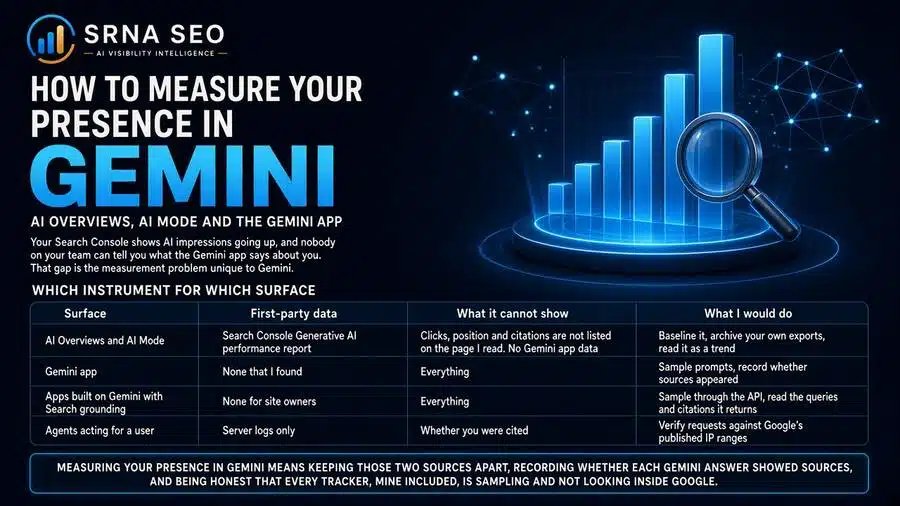
That gap is the measurement problem unique to Gemini. Gemini presence has two halves that need different instruments: Google’s AI Search features have first-party data, impressions only, while the Gemini app has no first-party report that I could find. So you measure the first from Search Console, the second by sampling, and you never blend them into one number. Measuring your presence in Gemini means keeping those two sources apart, recording whether each Gemini answer showed sources, and being honest that every tracker, mine included, is sampling and not looking inside Google. This is the measurement half of a pair.
What is in This Series
This article is part of cluster How to Measure Your Presence in AI Search Engines, the series hub containing the: How to Optimize Your Website for ChatGPT, How to Measure Your Presence in ChatGPT, How to Optimize Your Website for Perplexity, How to Measure Your Presence in Perplexity, How to Optimize Your Website for Claude, How to Measure Your Presence in Claude, How to Optimize Your Website for Gemini, How to Measure Your Presence in Gemini.
The optimization half is How to Optimize Your Website for Gemini.
What “Presence in Gemini” Means
Presence in Gemini is how often your pages appear in Google’s AI Search features (AI Overviews and AI Mode), how often your brand is named and your pages are cited in the Gemini app, and how accurately you are described, each measured separately.
The terms are the same as in the optimization article. AI Overviews are AI-generated summaries inside Google Search. AI Mode is a conversational search mode inside Google Search. The Gemini app is Google’s standalone assistant. And grounding means the model is given retrieved content at the moment it answers. A mention is your brand name in the answer text. A citation is a source link that names one of your pages.
Google states that no third-party tool has access to its internal ranking or AI systems. I think that is a fair sentence for every vendor to put on their homepage. It means the only first-party Gemini data you can get is Google’s own, and everything else is a sample. Plan accordingly.
Which Instrument for Which Surface
| Surface | First-party data | What it cannot show | What I would do |
|---|---|---|---|
| AI Overviews and AI Mode | Search Console Generative AI performance report | Clicks, position and citations are not listed on the page I read. No Gemini app data | Baseline it, archive your own exports, read it as a trend |
| Gemini app | None that I found | Everything | Sample prompts, record whether sources appeared |
| Apps built on Gemini with Search grounding | None for site owners | Everything | Sample through the API, read the queries and citations it returns |
| Agents acting for a user | Server logs only | Whether you were cited | Verify requests against Google’s published IP ranges |
Read the table as a warning: the only surface with an official report is the one that gives you the least detail.
Instrument 1: The Search Console Generative AI Report
Google’s help page for the report describes what it covers, and I will stay close to what that page says. The report shows how your content performs in AI Overviews and AI Mode together, and Google says the same impressions also count in the Web search type of the standard Performance report. I did not find a statement of exactly how the two relate, so I will not subtract one from the other: Not enough available data.
What to know before you present it to anyone:
- It is impressions, and not much else. The page I read does not list clicks, average position or citations for this report. An impression says you were shown, not that anyone read, clicked or believed it.
- It excludes the Gemini app. Google’s setting page for generative AI features lists AI Overviews, AI Mode and Discover, and does not mention Gemini.
- It needs volume. Google says the report may not appear at all if your site has not received enough impressions in generative AI features, so small sites may see nothing.
- Reading it has limits. All dates follow Pacific Time, the table has a 1,000-row limit, and the newest data can be preliminary and may change within hours.
- Filters are limited. The dimensions I could confirm are page, country, date and device, plus a filter for text versus multimodal queries. I did not find a filter that separates AI Overviews from AI Mode.
So here is how I would use it. Archive your own exports every week, so that your history does not depend on the interface. Track it as its own series, never merged with standard organic impressions. Look at which pages gain and lose, not only the total. And pair each swing with your own change log (what you published, updated or excluded), because the report cannot tell you why. If your impressions fall to nothing on every page at once, check the Search generative AI setting before anything else. I explained why in the optimization article, and a property set to Exclude removes you from these features.
For the wider shift in what visibility means when answers replace clicks, see Zero-Click Visibility and Zero-Click Synthesis and AI Answer Attribution.
Instrument 2: Sampling the Gemini App
For the app, you sample. Google’s help page on related sources gives you the one documented signal worth recording. Gemini shows sources only when it has them for a response, behind a Sources button that opens a panel of links. Not every response has them, and the page says the links are a way to explore related content, not verification of the answer.
That gives you a clean field for every answer: sources shown or not. My inference, not a documented equivalent: answers with no Sources button are the closest thing to a memory-only answer you can see from the outside, so I would keep the two groups apart the way I do for Claude. Google’s overview page says Gemini draws on external sources such as Google Search, which it calls retrieval augmentation, but it does not explain when. That page was last updated in July 2024, so treat it as context only.
Set it up like this:
- Build a non-branded prompt set from buyer questions. Keep branded prompts in a separate list, because they mostly show that your name is known.
- Freeze and version it. Silent edits break the trend line.
- Use clean sessions with the same account state, language and country every time, and write that down.
- Run each prompt several times per cycle. My working range is three to five, which is my judgment and not a standard.
- Record for every answer: sources shown (yes or no), your URL among the sources, brand named, how you were described, competitors named, and which sources they got.
- Read the answers. A mention that gets your product wrong is a problem, not a win, and I wrote about the risk in LLM Hallucination and Content Risk.
If you want a quick first read without building anything, the AI Visibility Inspector (my diagnostic tool for checking how AI systems see a brand) is the fastest start, and there is a guide to using it here.
Instrument 3: The API, for Repeatable Sampling
If you have an engineer, Google’s grounding documentation gives you something no consumer interface does. With the Google Search tool enabled, the model decides whether a search would improve the answer, generates the queries itself, and the response lists those queries and carries inline citations with the source URL and title. That has two measurement uses:
- A query log. The searches Gemini ran are visible in the output. Collect them across your prompt set and you can see what sub-questions it actually asks in your category. That is the closest view of query fan-out you can get, and it is a better brief for your content team than any keyword tool.
- Citations you can count. Cited URLs come back as data, so counting how often your domain appears is a matter of parsing, not reading.
Now the honest limit. Nothing I read says the API’s grounding behaves like AI Overviews, AI Mode or the Gemini app. So an API sample is a proxy for the Google ecosystem, not a copy of any one surface. Say that in every report, and do not present API numbers as “what Google shows”.
The cost is small. Google’s page says that for Gemini 3 and newer models, billing is per search query the model runs, with the first 5,000 search requests per month free across those models and $14 per 1,000 after that, and a default paid-tier quota of 1,500 requests per day per project. By that arithmetic, 40 prompts at five runs is 200 answers. At 3 queries each that is 600 queries, and at 10 each it is 2,000. Both sit inside the free allowance as the page describes it. Check current pricing before you budget, and remember that token costs are separate.
A Cheap Retrieval Test for Your Key Pages
Google’s URL context documentation describes a tool that fetches the URLs you put in a prompt. It checks an internal index cache first and falls back to a live fetch, and supports HTML, PDF, images and text formats, with up to 20 URLs per request. Paywalled content is unsupported, and it does not follow links nested inside the pages. Each attempt returns a status per URL, which the page says is mainly for debugging. So you can run your ten most important pages through it and read the status. A page that fails here has a retrieval problem worth fixing before you measure anything else. The page does not say how robots.txt is handled for this tool, so I will not claim anything about it.
Measuring Traffic and Logs
Here I have less than I would like, and I would rather say so. I did not find Google documentation on how visits from the Gemini app are labeled in GA4 or what referrer they carry. So look at your own analytics for what actually arrives, write down the exact source and medium values you see, and build a custom channel only after that. Assume undercounting, and remember that analytics sees clicks only, so every answer that names you without a link is invisible there. I explained why this part of the funnel stays dark in The AI Dark Funnel, and how to handle attribution honestly in AI Visibility Is Breaking Revenue Attribution.
Do not use Gemini referral traffic as your presence metric, because it counts only the people who clicked.
Server logs are weaker here than for other engines. Per Google’s crawler documentation, Googlebot is the crawler behind Search indexes and Google-Extended has no separate user agent string, so Google-Extended will never appear in your logs, and Googlebot hits do not tell you whether you were used in an AI answer. The one thing logs can show is agent traffic. Google-Agent, the token for agents running on Google’s infrastructure on behalf of a user, appears with published IP ranges in the user-triggered fetchers documentation, and Google cautions that user agent strings can be spoofed, so match the IP list.
The Numbers I Would Track
| Number | Source | What it answers | The trap |
|---|---|---|---|
| AI impressions by page | Search Console | Which pages are being shown in AI Overviews and AI Mode? | Impressions only. No clicks |
| Sources-shown rate | Gemini app sampling | How often does Gemini ground its answers in your category? | Absence of the button is a proxy, not a proof |
| Mention rate | Gemini app sampling, non-branded prompts | Does Gemini know you in this category? | Branded prompts inflate it |
| Citation rate | Sampling and API | Does Gemini use your pages as sources? | A listed source is not verification |
| Query themes | API query log | What does Gemini actually search for in your category? | An API proxy, not the app |
| Share of voice | Mention counts plus competitors | Who owns the category answer? | Moves with the competitor set |
Share of voice follows from the mention counts, and I explain how to build it in AI Search Visibility Share of Voice. For how fast mentions change, see AI Mention Velocity.
Where to Stop Doing It by Hand
Count it plainly. 40 prompts, five runs, is 200 answers per cycle in the app alone, and someone has to read them and log the sources. That is why I built tooling. For ongoing tracking with repeated runs and competitors, NovaX (my AI Visibility Intelligence Platform) covers Gemini among the five engines in this series. I built it, so judge me accordingly, and compare it with others in Best AI Visibility Tools. If you would rather have a baseline set up and read by someone who has worked inside enterprise teams, see Enterprise Search Advisory or get in touch.
What This Is NOT
This is not a ranking check. Google documents no position to track for these features. It is not a traffic report, since most presence never becomes a visit. It does not prove your changes caused your results, only that two things happened in sequence (see Why SEO Tools Cannot Audit AI Visibility). It is not a one-off audit, because one run on one day is a screenshot. And it is not a window into Google. Every number here except the Search Console report is a sample.
Mistakes I Would Check For First
- Blending Search Console data with app sampling. Different surfaces, different definitions.
- Reading impressions as visits. The report does not list clicks.
- Reading a listed source as proof. Google describes sources as a way to explore, not verification.
- Treating the API as the Gemini app. It is a proxy.
- One run per prompt. Variation looks like growth.
- Branded prompts in the headline number. They show recognition, not choice.
- Not checking the Search generative AI setting when impressions drop to zero.
- Tracking only Gemini. Strong here says nothing about the other four engines.
Estimated Gain After Implementation
Measurement does not raise your presence. It shows you which surface you are missing from and which prompts and sources a competitor holds instead of you. Any gain comes from the fixes afterwards, and for those I have no honest cross-company range: Not enough available data. Expect the first reliable read after a baseline and several repeated cycles. Before that, treat any swing, up or down, with suspicion.
The Uncomfortable Part
Search Console’s AI report tells you that you were shown, not that anyone read, clicked or believed it, and it is still the best official number you will get. That should make you humble about every dashboard in this space, including mine. The honest report to an executive has three parts: the official impressions trend, a sampled view of the Gemini app with its method attached, and a plain sentence saying which parts of Google’s AI surfaces nobody outside Google can see.
Where to Go From Here?
Begin with the AI Visibility Inspector for a first read. When you need Gemini tracked over time against named competitors, NovaX does that. And if you want it scoped for your market, contact me..
FAQ
How often your pages appear in AI Overviews and AI Mode, and how often your brand is named and your pages cited in the Gemini app, each measured separately. I do not combine them.
Yes. The Search Console Generative AI performance report covers both together. The page I read does not list clicks, position or citations for it, and it does not cover the Gemini app.
I found none that shows site owners brand-level mentions or citations: Not enough available data.
Whether sources were shown, whether your URL was among them, whether your brand was named and how it was described, which competitors appeared and which sources they got. Keep the full answer text.
No. Google’s help page describes the links as a way to explore related content, and it says Gemini shows sources only when it has them.
Yes, as a proxy. With the Google Search tool enabled, the response lists the queries the model ran and carries citations with URLs. Nothing I read says it matches AI Overviews, AI Mode or the app, so label it as a proxy.
Per Google’s page, for Gemini 3 and newer models billing is per search query, with the first 5,000 requests per month free and $14 per 1,000 after that. By that arithmetic, 200 answers at up to 10 queries each fit inside the free allowance. Check current pricing first.
No. Google says it has no separate user agent string, so it only works as a robots.txt control.
No. Promise a baseline, a locked method, repeated runs and a clear cadence, and report gains with the method attached.
This article was researched and drafted with the assistance of AI tools and reviewed and edited by author prior to publication.
